

Free Software
FREEDC QueryStudio
Cross-Platform Database Query Tool with Built-In AI Assistant
A desktop database client for MySQL, PostgreSQL, SQLite, and SQL Server. It includes an AI assistant that understands your actual schema, so it writes queries using your real table names and columns. You can also generate ERD diagrams, edit data inline, and export results in multiple formats. Free, offline, no account needed.
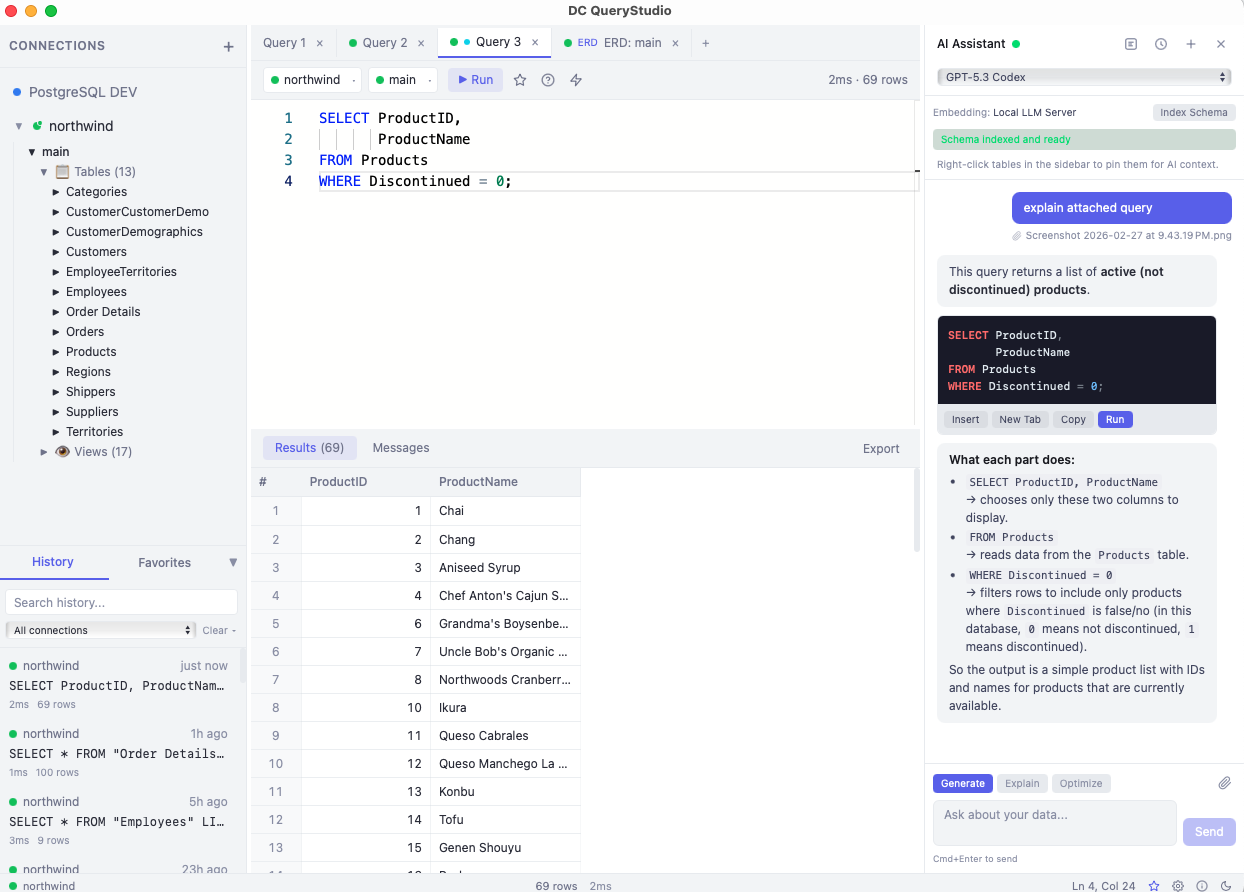
Most database tools are either expensive and bloated, or too simple to be useful. You end up jumping between a query editor, a browser for schema docs, ChatGPT for SQL help, and a spreadsheet for exports. It should all be in one place.
DC QueryStudio puts a SQL editor, AI assistant, ERD viewer, data editor, and export tool into one desktop app. The AI knows your actual database schema, not just generic SQL, so it writes queries that work on the first try.
Download DC QueryStudio
Select your platform and accept the terms to download.
4 platforms available. Select your platform above.
DC QueryStudio runs entirely on your machine. Your database credentials and query data never leave your device. The AI assistant only sends queries to your chosen LLM provider — nothing is stored on our servers.
Interface Overview
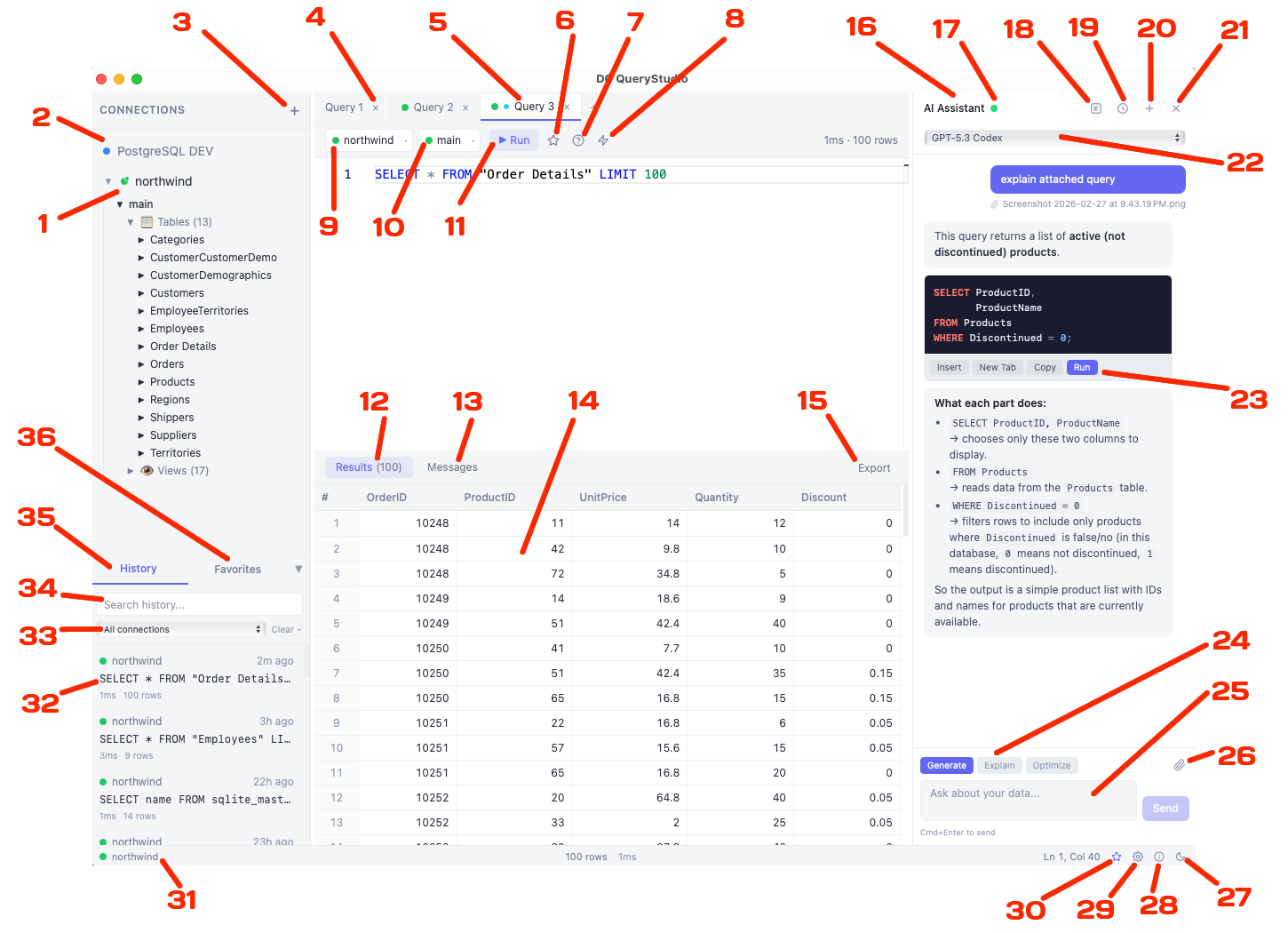
Here's what each part of the interface does.
Sidebar
- 1 Current Active Connection
- 2 Connection Panel
- 3 Add New Connection
- 31 Current Connection Indicator
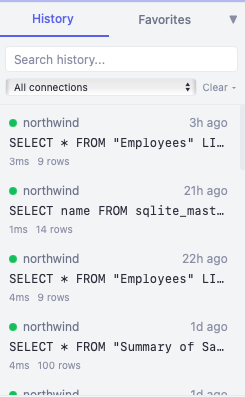
- 35 Query History Tab
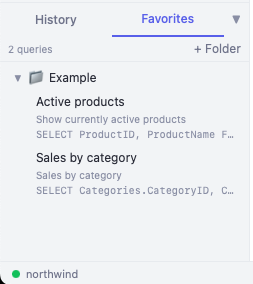
- 36 Favorites Tab
- 32 SQL Query History
- 33 Filter History by Connection
- 34 Search Query History
SQL Editor
- 4 Query Tabs
- 5 Current Active Tab
- 9 Connection Used by Tab
- 10 Selected Database
- 11 Execute SQL Query
- 6 Save to Favorites (Cmd+S)
- 7 Explain Query (AI)
- 8 Optimize Query (AI)
Results
- 12 Results Tab
- 13 Messages Tab
- 14 Result Grid
- 15 Export Result Grid Data
AI Assistant
- 16 AI Assistant Panel
- 22 Select LLM Model
- 17 Embedding Indexing Status (Green = Ready)
- 18 Toggle Embedding Panel
- 19 Toggle AI Chat History
- 20 Start New AI Chat
- 21 Close AI Assistant Panel
- 23 Run Generated SQL Query
- 24 Select AI Task (Generate / Explain / Optimize)
- 25 AI Chat Input Box
- 26 Attach File to AI Chat
Status Bar
- 27 Toggle Light/Dark Theme
- 28 Open About Dialog
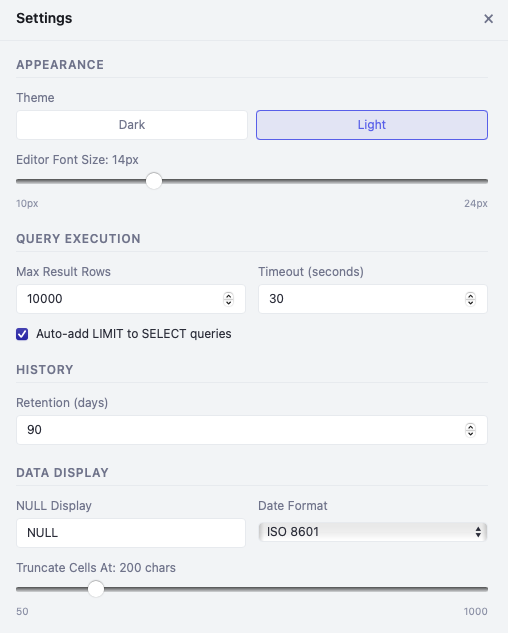
- 29 Open Settings
- 30 Open AI Assistant Panel
MySQL
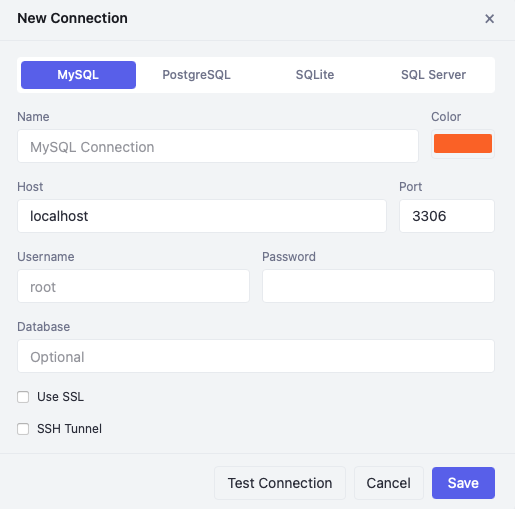
Full MySQL support with INFORMATION_SCHEMA introspection, SSL connections, and SSH tunneling for secure remote access.
PostgreSQL
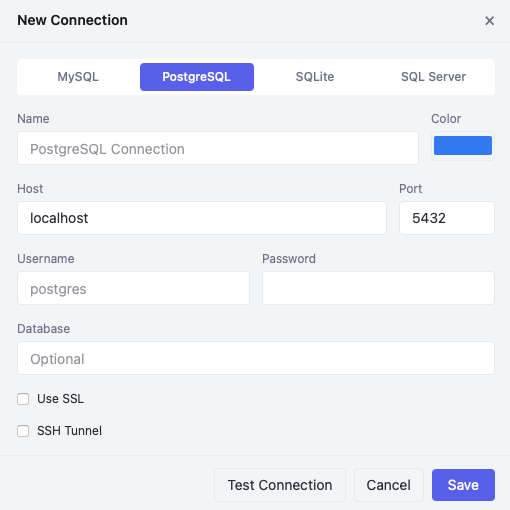
PostgreSQL support with pg_catalog queries, per-database connection pools, and schema-level object browsing.
SQLite
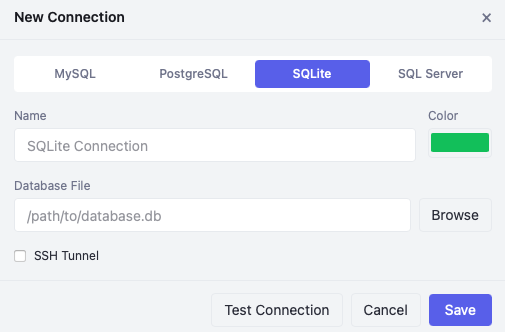
Local SQLite databases via file picker. Browse tables using sqlite_master and PRAGMA introspection.
Monaco Editor
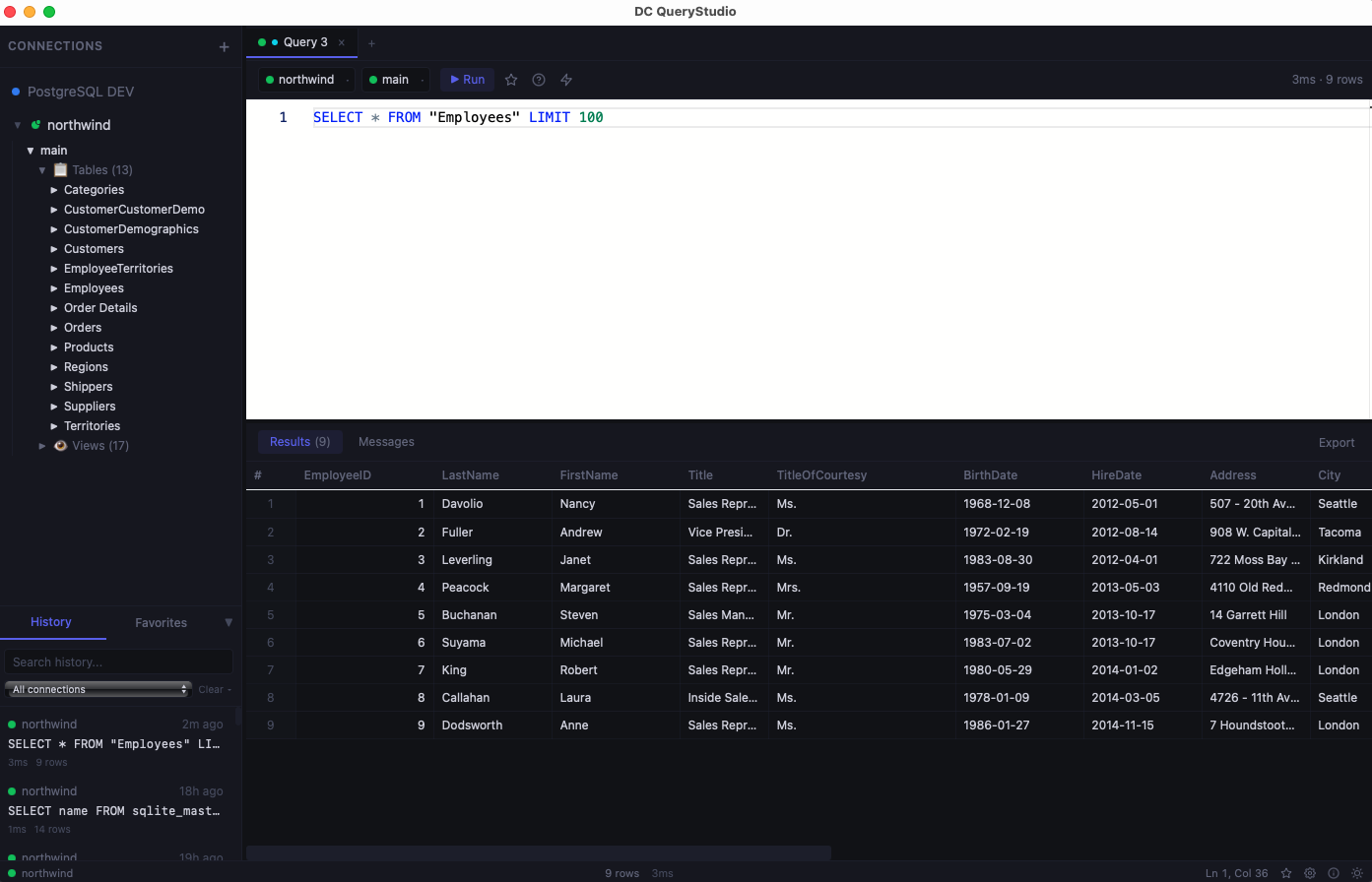
Powered by the same editor engine as VS Code. Syntax highlighting, auto-complete, and per-engine awareness.
Multi-Tab Editing
Work on multiple queries simultaneously. Each tab binds to its own connection and database with a color-coded dot.
Execute Selection
Highlight a portion of SQL and press Cmd+Enter to run just that part. Full keyboard-driven workflow.
Generate SQL
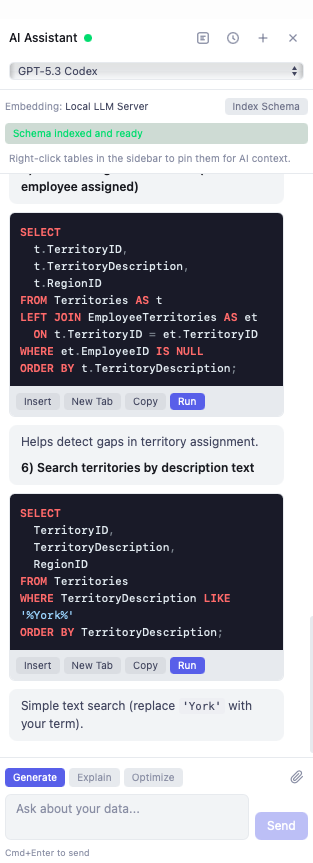
Describe what you want in plain English and the AI writes the query using your actual table names and columns.
Explain Queries
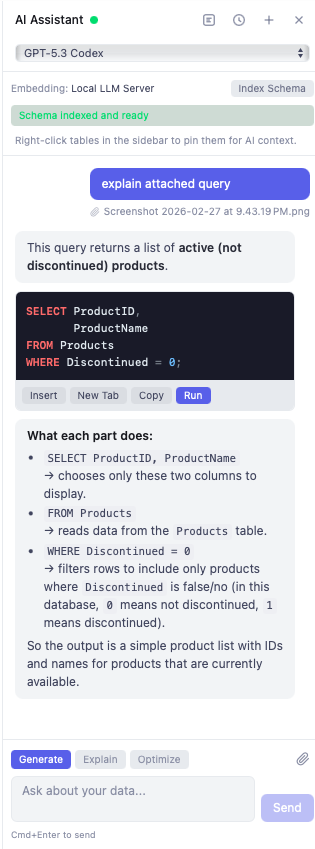
Paste a complex query and get a plain-English breakdown of what each clause does.
Optimize Queries
Submit a slow query and receive optimization suggestions based on your database schema and indexes.
MCP Server & REST API
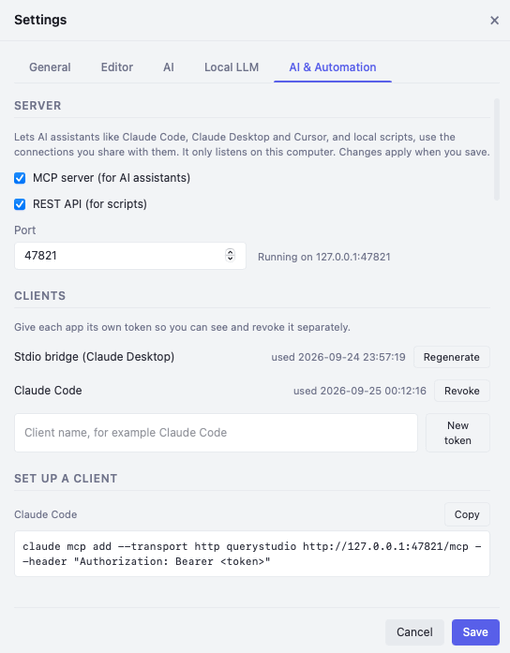
Let Claude Code, Claude Desktop, Cursor, or your own scripts query the connections you share. It only listens on your computer, and each app gets its own revocable token.
Per-Connection Access
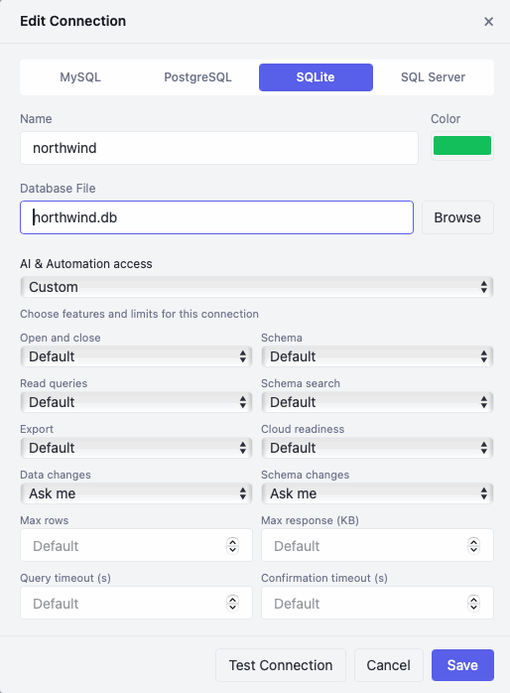
Every connection starts hidden from AI tools. Make it read-only or pick exactly which features are allowed, with limits on rows, response size, and query time.
You Approve Every Change
Set data and schema changes to Ask me. A dialog shows the exact SQL an assistant wants to run, and nothing runs until you approve it.
Schema Embeddings
Index your database schema into vector embeddings so the AI knows your tables, columns, and relationships.
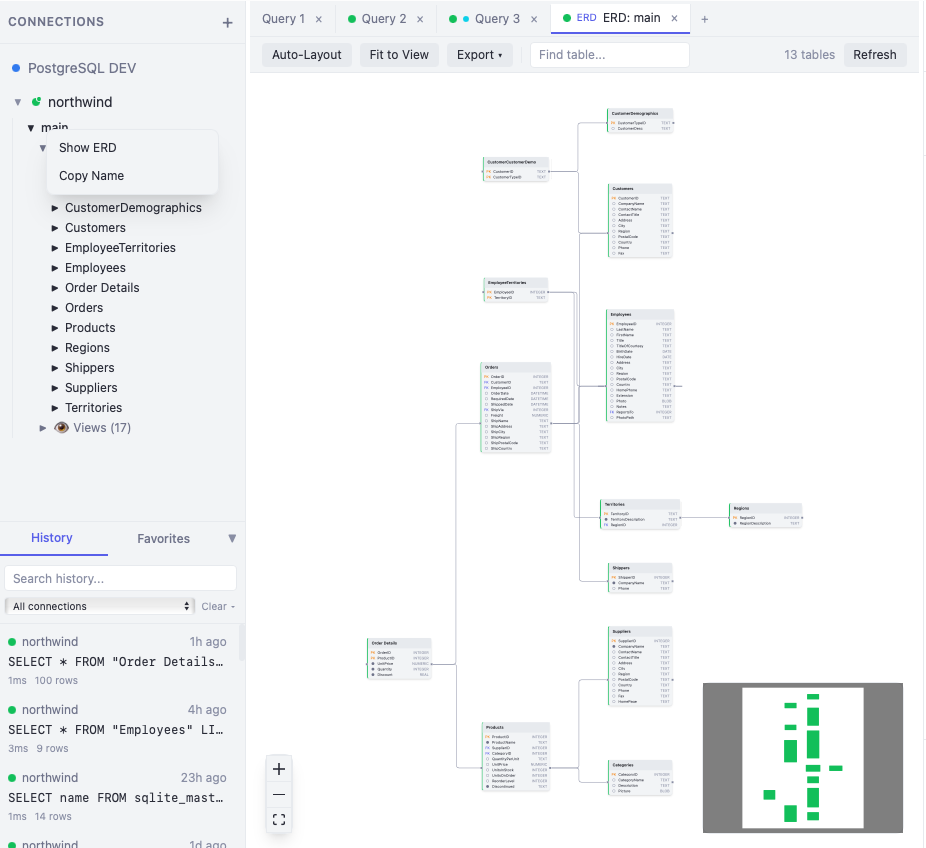
Visual ERD Diagrams
Generate interactive entity-relationship diagrams from your live database with auto-layout and export.
Object Browser
Lazy-loading tree showing databases, tables, views, stored procedures, functions, indexes, and triggers.
Editable Grid
Edit First 500 Rows: double-click cells to edit inline, add/delete rows, and apply changes with generated SQL.
Export Formats
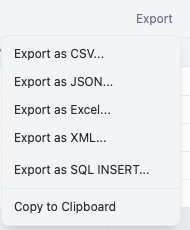
Export results as CSV, JSON, Excel (.xlsx), XML, SQL INSERT statements, or copy to clipboard.
Table Operations
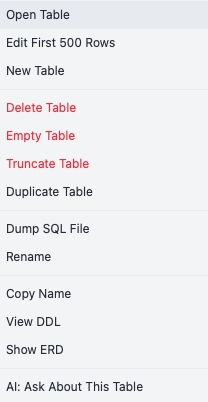
Right-click tables to open, edit, delete, empty, truncate, duplicate, dump SQL, rename, or view DDL.
macOS & Windows
Native builds for macOS (Apple Silicon and Intel) and Windows (MSI installer or NSIS setup).
Multiple LLM Providers
Choose from OpenAI, Anthropic, Google, ChatGPT, or any local LLM server (Ollama, LM Studio).
Dark & Light Themes
Toggle between dark and light themes with a single click. Deep navy-charcoal dark or clean white light.
See It In Action
Explore the interface with screenshots of each feature.
Key Features
- 4 database engines in one app. MySQL, PostgreSQL, SQLite, and SQL Server
- AI Assistant with Generate, Explain, and Optimize modes that understands your actual schema
- Local MCP server and REST API so AI assistants like Claude Code can query connections you share, with your approval for changes
- SSH tunnels for MySQL, PostgreSQL, and SQL Server with password or private key
- Visual ERD diagrams generated from live database schemas with auto-layout and export
- Schema embedding indexing for context-aware AI responses using your real tables and columns
- 5 LLM providers. OpenAI, Anthropic, Google, ChatGPT, and fully local/offline LLM
- File attachments in AI chat. Share ERD screenshots, CSV data, SQL scripts, and PDF specs
- Monaco-based SQL editor with syntax highlighting and multi-tab editing
- Editable data grid for direct row manipulation with change tracking
- Export to CSV, JSON, Excel, XML, and SQL INSERT statements
- Query history with full-text search, connection filtering, and selective cleanup
- Favorites with folder organization and AI few-shot learning context
- Cross-platform. macOS (Intel and Apple Silicon) and Windows
- Built with Rust backend for native performance, not Electron
- Completely free, no ads, no account required
How It Works
Connect
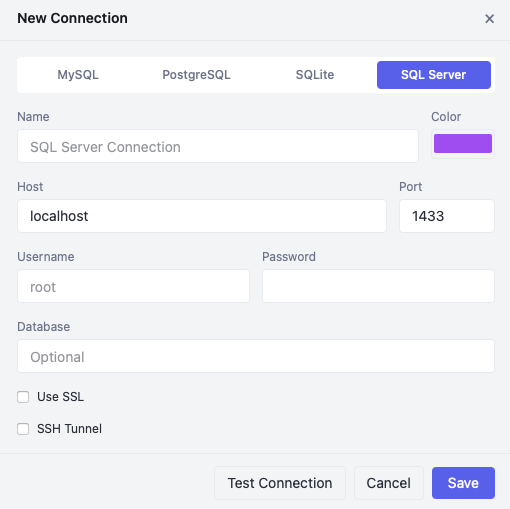
Add your database connection. MySQL, PostgreSQL, SQLite, or SQL Server. Test it with one click.
Query
Write SQL in the editor or ask the AI to generate it. Browse your schema in the object tree.
Analyze & Export
View results in the grid, edit data inline, visualize with ERD diagrams, and export in any format.
Who Is This For?
DC QueryStudio is built for:
Backend Developers who need a fast, modern SQL client for daily database work
Database Administrators managing multiple databases across different engines
Data Analysts running queries with AI assistance to explore datasets
Students & Educators learning SQL with AI-powered explanation and query generation
Anyone who wants a lightweight, AI-powered alternative to heavy database tools
System Requirements
macOS
- macOS 12+ (Monterey or later)
- Apple Silicon (M1/M2/M3/M4) or Intel
- ~50 MB disk space
Windows
- Windows 10 or 11 (64-bit)
- ~50 MB disk space
- MSI installer or NSIS setup
All database connections are made directly from the app. No additional drivers or middleware needed.
Getting Started
- 1
Download and install
Run the DMG on macOS or MSI/Setup on Windows. Open the app and you're ready to go.
- 2
Add a connection
Click the + button in the sidebar, select your database engine, fill in credentials, and test the connection.
- 3
Write and run queries
Type SQL in the editor or ask the AI to generate it. Press Cmd+Enter to execute and see results instantly.
- 4
Set up AI (optional)
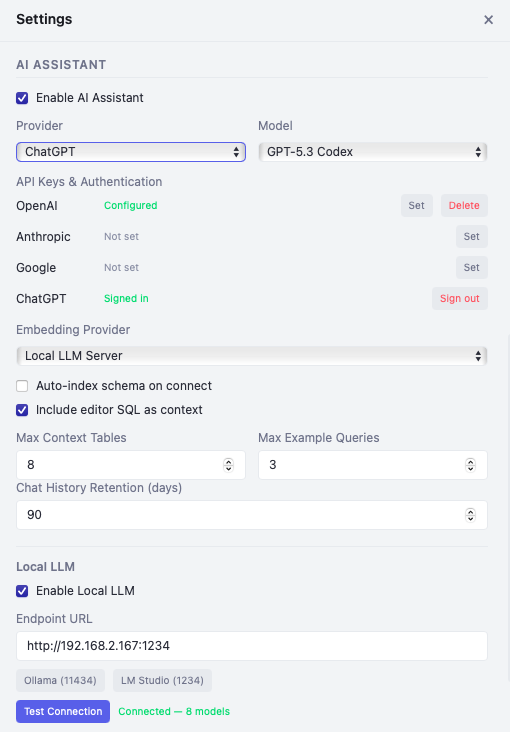
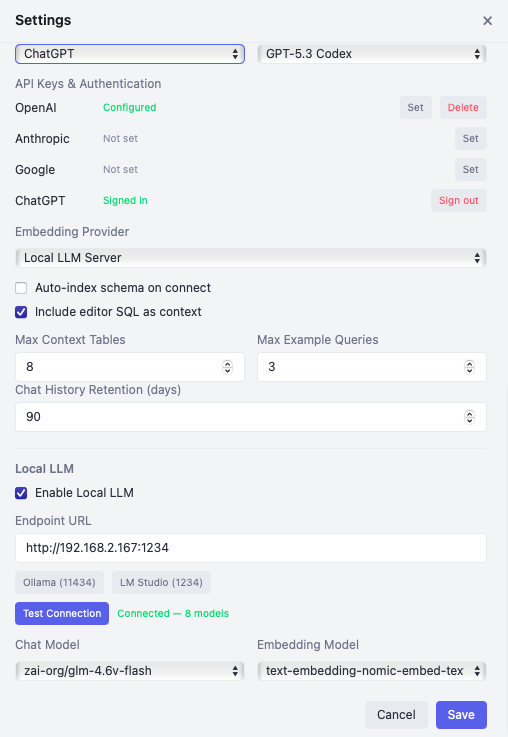
Open Settings, add an API key (OpenAI, Anthropic, Google) or connect to a local LLM. Index your schema for the best AI experience.
Setting Up the AI Assistant
The AI Assistant is optional but powerful. It uses your database schema to generate accurate SQL, explain queries, and optimize performance. Choose the setup that fits your needs.
Before you start: The AI Assistant requires an active database connection. Connect to a database first, then the AI can read your schema to generate accurate, context-aware queries.
Cloud API Key
OpenAI, Anthropic, or Google
- 1 Get an API key from OpenAI, Anthropic, or Google AI Studio
- 2 Open Settings → Enable AI Assistant
- 3 Select your Provider and paste your API key
- 4 Choose a Chat Model (e.g., GPT-4o, Claude Sonnet 4.6, Gemini 2.5 Flash)
- 5 Set Embedding Provider to the same provider, or use "Local (offline)" for free embeddings
ChatGPT Sign-In
Use your ChatGPT subscription
- 1 Open Settings → Enable AI Assistant
- 2 Select ChatGPT as the provider
- 3 Click Sign In and authenticate with your ChatGPT account
- 4 Choose a Codex model (e.g., GPT-5.3 Codex) for chat
- 5 Set up a separate Embedding Provider (see note below)
Local LLM
Ollama or LM Studio
- 1 Install Ollama or LM Studio and download a model (e.g.,
llama3.2:8b) - 2 Open Settings → Scroll to Local LLM section and enable it
- 3 Enter endpoint URL (Ollama:
http://localhost:11434, LM Studio:http://localhost:1234) - 4 Click Test Connection to verify, then select a Chat Model
- 5 Download an embedding model (e.g.,
nomic-embed-text) and select it as Embedding Model
Hybrid Approach
Mix local and cloud providers
Mix and match providers to optimize for cost, quality, and privacy. The chat model and embedding provider are configured independently.
Understanding Embeddings
Embeddings are what make the AI understand your database. When you connect, QueryStudio indexes your table names, columns, types, and relationships into a vector representation. This lets the AI find the right tables and columns when you ask a question, even if you don't remember exact names.
Chat Model
Generates SQL, explains queries, and answers questions. Requires a cloud API key, ChatGPT sign-in, or local LLM.
Embedding Model
Indexes your schema for context-aware AI. Options: built-in "Local (offline)", a Local LLM server, or cloud API (OpenAI/Google).
Changelog
v0.4.0 - AI & Automation (MCP Server + REST API)
Released: September 24, 2026
New
- AI & Automation: AI assistants like Claude Code, Claude Desktop, and Cursor, and your own scripts, can now work with the connections you choose to share. DC QueryStudio runs a local MCP server and REST API that only listens on your computer.
- Per-connection access: Every connection starts hidden from AI tools. Set each one to Read-only, Defaults, or Custom, and choose which features are allowed, such as reading data, browsing the schema, exporting, or making changes.
- You approve every change: Data and schema changes can be set to Ask me. A confirmation dialog shows exactly which SQL will run, and nothing runs until you approve it.
- Client tokens: Give each app its own token, see when it was last used, and revoke it at any time. Copy-ready setup commands are included for Claude Code and Claude Desktop.
- Tools for assistants: Read-only queries, schema browsing and search, query history, favorites, export, and cloud readiness checks.
- Privacy controls: Mask sensitive columns (including keys inside JSON values), cap rows, response size, and query time, and review every call in the activity log.
Bug Fixes
- PostgreSQL json and jsonb columns showed NULL
- PostgreSQL temporary schemas cluttered the object browser
v0.3.0 - SSH Tunnels, Current AI Models & Editor Fixes
Released: September 24, 2026
New
- SSH tunnels: Connect to MySQL, PostgreSQL, and SQL Server through an SSH server with a password or private key.
- Current AI models: Updated model lists for OpenAI, Anthropic, and Google, checked against each provider's live list when a key is set. Retired models move to their replacements automatically.
- Set to NULL: A toolbar button, context menu item, and Cmd/Ctrl+Shift+0 shortcut set a cell to NULL, so the text "NULL" can be stored as a real value.
- Max Output Tokens setting for AI responses.
Improvements
- Each editor tab keeps its own cursor, scroll position, and undo history.
- DC QueryStudio asks before discarding unsaved grid edits or closing a tab with a running query.
- Copy as UPDATE builds a proper WHERE clause from the primary key.
- Query history is cleaned up at startup according to your retention setting.
Bug Fixes
- SQL Server dates, times, decimals, money, and unique identifiers showed as NULL
- PostgreSQL numeric, money, and UUID values and MySQL decimals lost precision
- Switching tabs could apply one table's grid edits to another table
- Streamed AI responses could show doubled or garbled text
v0.2.1 — Updated Links
- Updated in-app links to the new app hosting domain apps.digitalcoding.com, including Terms & Conditions and Privacy Policy
- Contact and custom project links now point to the new start a project page
What's Next?
We're actively developing new features including:
- SQL Server (MSSQL) full feature parity
- Auto-complete with schema-aware suggestions
- Query plan visualization (EXPLAIN ANALYZE)
- Data import from CSV/JSON/Excel
- Connection groups and workspaces
- Linux support
Have a suggestion? We'd love to hear what features you need most.
Frequently Asked Questions
Do I need the AI Assistant to use DC QueryStudio?
Do I need to connect to a database before using the AI?
What are schema embeddings and how do they work?
orders, order_date) even if you don't remember the exact names. This is what makes the AI schema-aware rather than just a generic SQL generator.
When does embedding indexing happen?
What are few-shot examples and how do they improve AI answers?
SELECT u.name, COUNT(o.id) FROM users u JOIN orders o ON u.id = o.user_id GROUP BY u.name, the AI learns your preferred join style, aliases, and patterns. The "Max Example Queries" setting (default: 3) controls how many examples are included. More examples give the AI better context about your conventions, resulting in SQL that matches your style.
Can I use ChatGPT sign-in for embeddings?
nomic-embed-text) or add an API key for OpenAI or Google embedding.
Is my data sent to the cloud when using the AI?
Which AI provider should I choose?
- OpenAI (GPT-4o): Best overall quality for SQL generation. Reliable and fast.
- Anthropic (Claude Sonnet 4.6): Excellent for detailed query explanations and optimization advice.
- Google (Gemini 2.5 Flash): Good balance of speed and cost. Free tier available.
- ChatGPT (Codex models): Great if you already have a ChatGPT Plus or Pro subscription. No separate API key needed.
- Local LLM: Best for privacy and zero cost. Quality depends on the model and your hardware.
Can I attach files to AI chat messages?
What databases are supported?
Is DC QueryStudio free?
Can I switch between AI providers without losing chat history?
Get Started Today
Download DC QueryStudio and work with your databases faster. The AI knows your schema.
Download Now
Need a Custom Desktop Application?
We build modern, cross-platform desktop applications tailored to your business needs. From internal tools and data analyzers to customer-facing software. Tell us your requirements and we'll build a polished application.
Discuss Your Project